Convert Casio QV100 cam files to jpg
I found on my PC a very old folder, probably coming from a backup, with a series of .cam files. Such files were created by a Casio application that extracts the pictures (via serial cable) from my old, but still working, QV100 camera.
Now, the problem is that I can’t view / open such files on my Win7 computer ; searching on the Internet, I found that Irfan View can handle this format and can do a batch conversion, but I haven’t such application on my PC and just need it for one shot, so I don’t like to install it. Another “simple” way seems to be perfect for me. In a forum’s thread, someone tells that you can simply rename .cam to .jpg in order to make it readable in the new format. That solutions wasn’t working for me (wrong file format error). Reading a .cam file with an Hex Editor (FrHed), I discovered that it really has JFIF signature inside, but there is a supplemental header (54 bytes) probably imposed by Casio. Removing such header and renaming the filename from .cam to .jpg, has made it readable, finally
Then, I decided to write my own application, using the FreeBasic compiler, to do this operation automatically.
The program is a pure executable : it doesn’t need for installation. Just get the .zip, extract the .exe and put this in the folder containing the .cam files you want to convert. Run the program, press ‘c’ and the conversion starts. At the end, you will find the old, untouched, files .cam and the new converted .jpg … Hope it will be useful for you
Disclaimer: this application is provided with no explicit or implicit warranties of operation. I do not assume any responsibility for problems that may arise on the device where the application is installed. The program is a “demonstration” and no support of any kind is provided. By downloading and installing the program, you implicitly accept my terms of not taking responsibility. If you do not agree, do not download and / or install the file !
Note: the zip file has a password. Check the hash of the zipped file, then extract it and you will have your executable ready to run. If you don’t have a tool for computing the hash, I suggest HashTab, free for personal use.
Note: DO NOT extract or use the downloaded file if MD5 doesn’t match with the following code : MD5: 29A64B8301D0A6392435FED19286EF99
The password is: eficara
Testing a defective touchscreen (resistive)
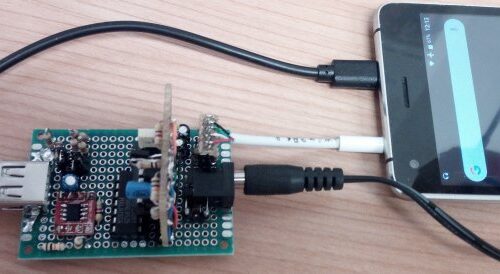
Hello, sometimes I leave one of my tablets in hands not so accustomed to “well-done” works, so this afternoon, I received back, from a technician, one tablet with “some defect in touch screen”. Obviously, when the tablet went out from my laboratory, it was fine, but now it isn’t. Ok, resistive touchscreen is very simple device. In order to understand what happened, I detached the flat cable from its socket and put it in another one, coming from old, used circuit. I soldered 4 wires to such used connector to measure the touchscreen resistence with a simple multimeter. In the picture below (a little bit out of focus, sorry), you can see the touchscreen’s flat cable withdrawn from the “natural” socket and inserted in the testing one.
The following picture one is a particular of the wiring. The four soldered wires are the X and the Y resistors of the touchscreen.
In the next picture you can see the multimeter, set to range 2K Ohms, that shows left positioned “1″ and it means over range resistence. The multimeter cables, actually, are connected to the couple of wires at the left (upper) side of my connector. The over range indicates that the circuit is open, and it’s right, ’cause I’m NOT tapping the touch screen in any position.
Next picture shows the multimeter measuring a value of 825 Ohm ; good, ’cause I’m pressing with my finger approx in the middle of touchscreen, now.
Now, I repeated the test moving my multimeter cables from the left two wires to the right two (the other axis of the touchscreen), but this time NO LUCK. The value read is always “1″ (out-of.range) even with touch not pressed and even if pressed. So, probably the flat cable has an interruption and the touchscreen is unuseable. Looking with optical power magnifier, I noticed that “someone”, closing the tablet after hardware modding, has damaged the small flat (micro interruption) and now there is only to look around on the Internet for a spare part ![]()
Ok, hope this will be useful for someone. Bye…
Simplest tool for tablet inspecting / repair
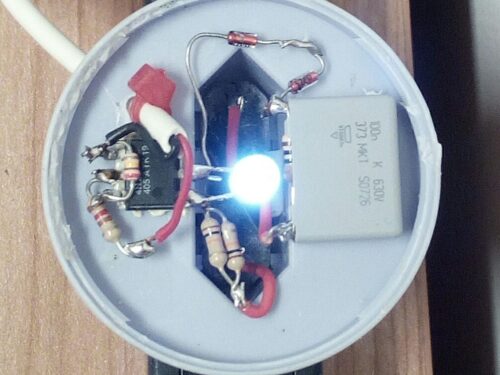
This is the simplest tool I use to see if a tablet is fully bricked or still has some activity. It has just a LED and a resistor, connected to the expander box, so is VERY simple to build. When you power-up your tablet, the green led must turn on and flicker. That means the serial port is outputting data. If the led turns off and your tablet doesn’t start with Android, the device is probably hanged in U-Boot, may be after wrong rom image used for upgrade.
If the led doesn’t turn on, the tablet is fully bricked and you have to reflash the SPI to revive it. If the led stays on until the Android starts and then makes a quick lamp every 60 seconds, your tablet is running fine and so, why are you reading this post ? ![]()
The led turns on ’cause is connected to the TXD data of the tablet. When your tablet sends data thru the serial port, the level that’s normally 3.3V goes to GND so the LED is directly polarized and turns ON. When the tablet doesn’t sends data, the TXD is 3.3V so there isn’t any voltage difference at the led terminals and it remains OFF.
PAY ATTENTION: don’t use a resistor with value less than specified, or you can destroy you serial output ! Look at the picture below for details; remarks are in italian, but I think are readable anyway (this tool is also described here in italian language).
Scritte a matrice di punti per macchine CNC
Questa utility genera il G-Code per produrre un testo a matrice di punti su macchine CNC.
I caratteri generati sono a matrice 5×7 punti, molto simili a quelli di un display LCD.
I punti sono generati con una serie di forature secondo le matrici relative ai caratteri del testo in input. Il “generatore di caratteri” è contenuto nel programma stesso.
Il programma genera come output un file di testo in formato .TXT con il nome uguale al messaggio inserito (primi 8 caratteri) e richiede come dati in input:
- la distanza dei punti che formano il carattere sull’asse X
- la distanza sull’asse Y
- il punto più basso (profondo) dell’asse Z
- il più alto (privo di ostacoli per posizionare XY)
- la velocità di movimento dell’asse Z in fase di foratura
- il tempo di attesa con la punta in posizione di Z down
- il testo della scritta da generare
E’ possibile selezionare la versione specchiata sull’asse X per realizzare forature non passanti su supporti trasparenti in modo da avere la scritta visibile in modo corretto sul lato liscio; si può infine scegliere l’unità di misura in mm o inches. Il programma è compilato a 16 bits (con compilatore GFW-Basic) e non richiede installazione. Funziona anche su Win 3.x, non è stato invece testato su Win XP o successivi. Nella figura sottostante si vede il risultato di un test eseguito sulla mia piccola macchina CNC.
Nota per il download : non viene fornita nessuna garanzia implicita o esplicita di funzionamento del programma. Non mi assumo nessuna responsabilità per eventuali problemi si dovessero presentare sul dispositivo dove l’applicazione verrà installata. Il programma è un “dimostrativo” e non viene fornita assistenza, né supporto di alcun genere. Scaricando ed installando il programma, accettate implicitamente le mie condizioni di non assunzione di responsabilità. Se non siete d’accordo, non scaricate il file e non installatelo !
Ho letto e compreso la nota, voglio scaricare il file typocnc.zip (17.7 KB)
(testato con: Win 3.x Win9x Win2K)
Oscillogio – orologio su oscilloscopio
Questo progettino consiste in un orologio digitale che ha la particolarità di avere come display un oscilloscopio ! Viene utilizzata SOLO la modulazione sull’asse Y, quindi si può utilizzare qualsiasi tipo di oscilloscopio, anche uno vecchio (e stanco). Questo progetto è stato pubblicato (a mio nome, naturalmente !) sul numero di Giugno 2007 della rivista CQ Elettronica (Edizioni CD). Il circuito è basato sul micro Atmel ATtiny2313 oppure AT90S2313 (vecchia versione). Se si usa la nuova versione, bisogna avere l’accortezza di programmare i “fuses” interni affinché venga utilizzato l’oscillatore quarzato esterno e non quello libero interno.
Ecco il circuito con l’alimentazione a 3V ricavata da due normali batterie AA.
Nel documento zip scaricabile da questo link troverete i files “batch” per programmare memoria flash e “fuses” del micro usando il programma freeware SP12.
Il file giugno07.zip contiene:
- schema.pdf – lo schema elettrico in PDF
- stampato.pdf – il circuito stampato in scala 1:1 formato PDF
- lista_materiali.txt – la lista dei materiali
- montaggio.jpg – lo schema di posizionamento dei componenti
- ckscope.hex – il file HEX per programmare il micro
- tinySetClock.bat – il file “batch” per programmare i “fuses”
- wrProg.bat – il file “batch” per programmare la flash
Digital clock that uses a single channel oscilloscope as display. Only the ‘Y’ axis modulation is used, so every old (and tired) oscilloscope can be used. This project was published (by me, of course !) on the 2007 June issue of italian magazine “CQ Elettronica”. The circuit is based on popular ATtiny2313 or AT90S2313 microcontroller. If you plan to use the new one (the ATtiny2313) please remember to program the fuses for external xtal oscillator. In the downloadable zip document at this link you can find the batch files to program the memory and the fuses of the microcontroller using the SP12 free tool.
File giugno07.zip contents:
- schema.pdf – the electric schematic in PDF format
- stampato.pdf – the PCB layout in 1:1 scale
- lista_materiali.txt – the bill of materials
- montaggio.jpg – the components mounting map
- ckscope.hex – the HEX file to burn the micro
- tinySetClock.bat – the batch file for micro’s fuses programming
- wrProg.bat – the batch file for micro’s memory programming
Smartphone WM6 – GPS tracker
GPS Tracker: crea un file .kml con le coordinate ricevute da un GPS
Questo programmino serve a visualizzare le coordinate GPS del punto dove ci si trova e per creare un file .kml (google maps) con la traccia del percorso. Il file minigps.kml generato nella directory My Documents, può essere visualizzato con google maps sullo smartphone o sul PC una volta trasferito su di questo. Nota importante: assicuratevi di avere una connessione internet “flat” sul cellulare se volete usare Google Maps o Google Earth ! Altrimenti, il vostro credito telefonico ne soffrirà parecchio…
Per ricevere le coordinate GPS si può utilizzare un ricevitore esterno Bluetooth o uno interno, se disponibile (sul mio Samsung i600 non c’è). Attenzione: la funzione “Stop Log / Save” salva i dati sempre sullo stesso file (minigps.kml), quindi se vi interessa conservare un tracciato, copiate il file salvato su uno nuovo, con un altro nome.
Il file .cab contenuto nel file .zip disponibile per il download è autoinstallante. Una volta estratto e trasferito sullo smartphone WM6, basta cliccarlo per avviare l’installazione ; vi verrà richiesta l’autorizzazione a procedere perché l’autore è sconosciuto a Micro$oft, ma l’autore sono io
Una volta eseguita l’installazione, troverete una nuova icona nell’elenco programmi, con il nome MiniGps. Se le impostazioni della porta seriale non corrispondono a quelle del vostro sistema, editate con blocco note il file minigps.ini
Compatibilità: Smartphone WM6 (Windows Mobile 6)

screenshot dell’applicazione ; la scrissi in Francia, come si evince dalle coordinate che appaiono in figura…
Nota per il download : non viene fornita nessuna garanzia implicita o esplicita di funzionamento del programma. Non mi assumo nessuna responsabilità per eventuali problemi si dovessero presentare sul dispositivo dove l’applicazione verrà installata. Il programma è un “dimostrativo” e non viene fornita assistenza, né supporto di alcun genere. Scaricando ed installando il programma, accettate implicitamente le mie condizioni di non assunzione di responsabilità. Se non siete d’accordo, non scaricate il file e non installatelo !
Ho letto e compreso la nota, voglio scaricare il file minigps.zip (475 KB)
(ultimo aggiornamento: V1.03 25/08/09) il file .zip contiene il .cab per l’installazione diretta
RFID reader for 125 KHz tags, RS232 output (also works as electronic lock)
This circuit, based on Atmel micro ATtiny2313, reads RFID tags at 125 KHz. The code of the first tag read after micro burning is stored in the internal earom and then causes a pulse of about one second on relay contacts every time that tag is placed near the reader. This makes it possible to realize a simple and touchless electronic lock. The stored tag, and every other tag that’s placed near to the reader, also cause the serial output of the inside code, in ASCII format, allowing to implement a generic reader for access control. This circuit was published by me on the magazine CQ Elettronica in the May 2009 issue and entitled “RFID reader 125KHz”; consult the magazine for more details on the circuit and implementation.
Want to take a look at C source file ? Click here …
To burn the micro, the freeware SP12 has been used, in the versions for WinXP or Win2K. The batch files included in downloadable ZIP require the use of this software for programming the micro (you can easily find it with a Google search). If you have another tool for micro burning, the configuration for fuses in the application described is the following :
// CONFIGURATION Fuses: Ext = 0xFF High = 0xC9 Low = 0xDF // Note: SP12 High Fuses used in only 6.1 bits, so 0xC9 (11001001) becomes 0x24 (100 100)
The downloadable file EF150.zip contains:
- schematic.pdf – electric schematic in PDF format
- top.pdf – Printed circuit board layout (single sided) in PDF 1:1 scale
- topprint.pdf – layout of components on the circuit
- rfid.hex – compiled HEX file ready to be burned into the micro
- wrFuses.bat – batch file to program the micro fuses
- wrProg.bat – batch file to start the firmware programming
- wrEarom.bat – batch file to overwrite the earom (stored tag)
- ef150pic.jpg – photos of the circuit mounted
- interfaces.gif – a couple of circuits to interface the card to a PC or a micro
- earom.txt – text file containing the 5 bytes to erase key tag in earom
Added Ago 30 2009
Coil has 105 turns of 0.2mm wire wound on 30mm diameter support; in the prototype I used the neck of a plastic bottle, visible in the figure.
Added Feb 28 2010
Note: The driver SN75176 is used ONLY as power driver, but the circuit works even if you remove the chip and simply put a jumper between pins 4 and 6 of the 8 pin socket. Obviously, the driver makes more “relaxed” the microcontroller’s output pin PB2.
Added Mar 1 2010
Note: You can browse the SP12 AVR programmer project at this site/url:
http://www.xs4all.nl/~sbolt/e-spider_prog.html.
Added Mar 2 2010
Oops, someone noticed that the circuit’s picture shows an ATTiny2313V-10PU cpu; well, the right chip is the one that’s in the circuit’s schematic diagram: the ATTiny2313-20PU. The last one, in fact, can run with the 16 MHz crystal needed by the application, while the first one is guaranteed only up to 10 MHz. The reason for the 10 MHz version mounted on board is (simply) that I didn’t own the fast version and tried (successfully) with the slow one. Ok, DON’T LOOK at the picture, look at the schematic diagram !!!
Added Sep 10 2010
The active range is about 3 cm with the coil shown in figure. Better results can be obtained modifying the coil diameter (and the number of turns, obviously).
Recently, I have done a personal version of RS232 (or USB-RS232 converter) programmer for ATtiny2313 micro using only 74HC00 as active part; if you like to use my own Atmel AVR programmer for ATtiny2313 burning, this is the map for fuses :
Invention #4: the WineCertifier
This device is based on olphactive cells of the dog, so if you don’t have one, please ask to your friends and then, when they made calm the dog, gently use a cutter to take a small, small slice of his nose. When you have cut the slice, probably the dog will bark and see you with much hate in his eyes, but explain him that it’s for a great experiment, then offer to meet a female pedigree dog as repair action. Well, when you have the nose slice, fullfilled of olphactive cells, you must connect it to a microcontroller. Take two copper wires and place them on the opposite faces of nose slide. Put an aluminium foil all around and leave just a little hole open, that will be your sensor’s active area. The microcontroller will be connected to LCD display for show you the results, but the internal memory is too small to contain all the samples needed for an accurate scanning of the substance under test. So, the micro communicates with a your smartphone via Bluetooth interface and the smartphone is connected to a huge database via internet.
How it works:
Turn on the device; a blinking led will inform you about the state of the device. If the led slowly turns on and off, then the device is sleeping (remember, it’s based on dog’s nose cells, so it will follow the dogs biorhytms). When the device is on, then go in a supermarket and go toward the drinks sector. Gently put the sensor on the bottle you want to scan and press the button on the device. The nose cells will activate immediatly and you can ear a sound like “sniff sniff” coming from the embedded loudspeaker. When this operation has been completed, the resultant raw data is sent, via internet, to the big database (it’s in Italy in “Castelli Romani” zone). In a couple of hours you will receive the answer: the bottle is wine, or water or dish cleaning formula, or all of them put together. Then you can buy it or leave it, following your istinct. Hope you can find it useful. Ask me for free plans of the entire device… Bye
P.S. no dogs were injuried by this invention, until now…
and today is April first…
… other “inventions” can be found at my “Probably True Corner“
P.O.V. – Auguri rotanti
Questo circuito genera la scritta “AUGURI” a matrice di punti, ma utilizzando solo una striscia di 7 (oppure 8) LED. Grazie alla P.O.V. (Persistence Of Vision), cioè l’effetto ottico di persistenza delle immagini sulla retina, basta far roteare la scheda (fissata, come si vede, su un bastoncino di legno con un perno in forndo), per vedere “apparire” la scritta. E’ possibile personalizzare il messaggio modificando in modo opportuno i valori scritti nella memoria dati. Pubblicato a mio nome sulla rivista CQ Elettronica Aprile 2007 con il titolo “Auguri rotanti”; consultare la rivista per maggiori dettagli.
Il microcontrollore utilizzato è un ATtiny2313 in SMD; lo schema in formato PDF è disponibile nel file scaricabile a questo link , insieme al resto della documentazione.
Il file Aprile07.zip contiene :
- sch.pdf – lo schema in formato PDF
- cs.pdf – il disegno del master in PDF stampabile in scala 1:1
- striscia.hex – il file compilato pronto per essere trasferito sul micro
- earom.txt – il file che contiene i dati per accendere la scritta AUGURI
- wrDati.bat – il file batch per avviare la programmazione dei soli dati (scritta)
- wrProg.bat – il file batch per avviare la programmazione del firmware e dei dati